Wither Storm Mod for Minecraft
Bejan AlexandruEvents
3.23.00 Reviews
- Version
- 1.8
- Installs
- 50.00K
- Age Rating
- Teen
Screenshots
Our Review of Wither Storm Mod for Minecraft
 Analysis by Appyee
I like the idea behind Wither Storm Mod because it points Minecraft players toward a clear, dramatic goal: prepare for a huge boss encounter rather than simply continuing a familiar survival routine. The app is free, and its focus is on Wither-themed mods and add-ons for Minecraft Pocket Edition. That makes it most interesting to players who already enjoy changing up their worlds and are comfortable checking whether an add-on suits their particular setup.
Who will get the most from it
I’d consider this app if I were looking for a specific kind of Minecraft session: one built around the prospect of a dangerous, oversized enemy and the preparation that goes with it. It is a better fit for players who like experimenting with community-created content than for someone seeking a polished, all-purpose Minecraft companion. If you mostly want the standard game, or prefer a small tweak that leaves survival play almost untouched, a large boss-focused add-on may be more disruption than you want.
There is also a practical distinction between finding an add-on and being ready to use it. The app’s focus can help narrow the search, but I would still check compatibility with my Minecraft version and device before making plans around a new world. For a shared session, I’d do that before inviting friends, not while everyone is waiting to play. That small bit of preparation is more useful than assuming every mod will work in every setup.
A sensible first run
My preferred approach would be to treat the first attempt as a test rather than a permanent change to a favorite world. I’d read the mod’s installation and summoning instructions carefully, then try the setup in a separate world if that option is available in my Minecraft environment. That gives me room to see how the add-on behaves without risking a long-running build or survival save. I would also make sure I understand the intended steps before triggering a major encounter; with a boss mod, the surprise is better saved for the fight itself.
That cautious workflow matters because the experience described here is not just a new enemy appearing in the distance. The original article presents a boss with a large presence, destructive attacks, and an encounter that calls for planning. I would therefore think about supplies, escape routes, and the surrounding terrain before starting. A wide, expendable area is a more sensible testing ground than a carefully designed base, especially when I do not yet know how the add-on will affect the world.
What to check before installing
The app is an events-focused Android app by Bejan Alexandru, with a Teen content rating. It was released on May 16, 2025, and its current version is 1.8. Those details help set expectations, but the most important practical check is still whether the content you choose works with the Minecraft edition and version you use. Minecraft add-ons are not automatically interchangeable across platforms or versions, so I would read the instructions attached to an individual download instead of relying on its title alone.
With a 7.0 minimum OS requirement, the app is intended for compatible Android devices. It has 50K+ installs and an average rating of 3.2 from 161 ratings, so I would approach it with measured expectations rather than assuming every user has had a smooth experience. It is free to download, while in-app purchases are listed at $19.99 per item. I’d check the purchase details before confirming anything and decide whether the free options already meet my needs.
Where it fits among Minecraft options
Compared with browsing for mods through general Minecraft communities or searching the web, a focused app can make it easier to look for content around the Wither and related add-ons in one place. The trade-off is that a narrow catalog is only useful if it gives you a suitable, compatible choice and clear instructions. General mod communities may offer broader discussion and troubleshooting, while this app’s appeal is its more specific theme. I would use it as a starting point for discovery, not as a reason to skip checking the details of the add-on itself.
A realistic use case is a weekend session with friends who already want a tougher Minecraft challenge. I’d browse ahead of time, agree on which add-on to try, test it in a throwaway world, and only then decide whether to bring it into a shared world. That sequence avoids turning the group’s playtime into a troubleshooting session. It also gives everyone a chance to decide whether a high-pressure boss encounter sounds fun before the world is changed around it.
What is the Wither Storm Mod?
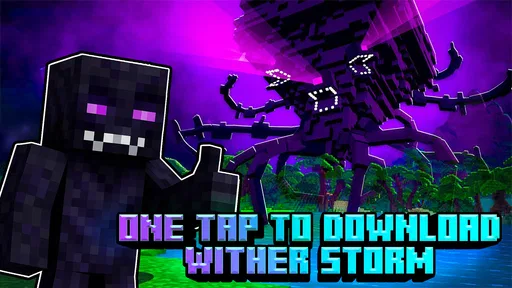
The Wither Storm Mod is a thrilling addition to your standard Minecraft gameplay. This mod adds an epic boss fight that completely transforms the way you interact with the game. Imagine taking the existing Wither boss and cranking it up to an eleven. It's like someone took the Wither, fed it steroids, and then taught it how to dance. Only, instead of dancing, it’s trying to destroy everything you hold dear.
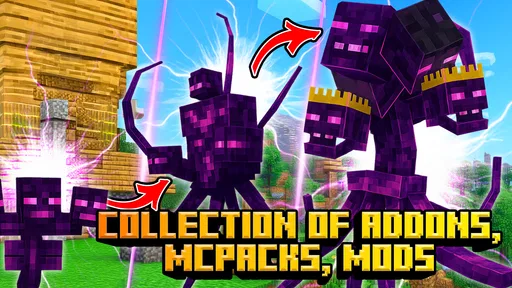
For those of you not familiar, the Wither Storm is based on the boss from Minecraft: Story Mode. It’s massive, it’s terrifying, and it’s ready to turn your world upside down. The mod brings this character into your Minecraft world, giving you a new challenge to tackle.
Getting Started
Before diving headfirst into battle, you'll need to get the mod installed. It's pretty straightforward if you’ve done mods before. Make sure you’re running the right version of Minecraft and have your mod manager ready. A quick download and installation, and you’ll be good to go.
Once installed, you’ll notice some new items and crafting recipes. This is where the fun begins. To summon the Wither Storm, you'll need to craft a special command block and initiate the summoning process. Trust me, it’s not a process you want to rush. Make sure you're geared up and ready for what’s coming.
The Battle of a Lifetime
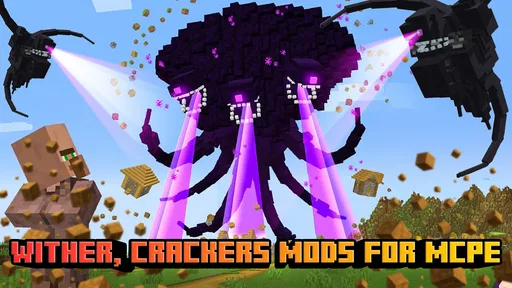
The moment the Wither Storm appears, the atmosphere shifts. It's not just a fight; it's a full-scale battle for survival. The creature is enormous, with multiple heads and a hunger for destruction. It’s not just beefed up in size; its abilities are through the roof. From sucking blocks into its swirling mass to firing off destructive projectiles, it’ll keep you on your toes.
What I love about this mod is the strategic depth it adds. It's not just about hacking and slashing your way to victory. You’ll need to plan, adapt, and think on your feet. Every encounter with the Wither Storm is unique, making each battle an unforgettable experience.
Why You'll Love It
If you’re someone who thrives on challenges, this mod is right up your alley. The sense of accomplishment when you finally take down the Wither Storm is unparalleled. It’s more than just a game; it’s a test of your Minecraft skills and your ability to adapt to new situations.
Plus, the mod doesn’t just end with defeating the boss. There are so many layers to explore, from the aftermath of the battle to the new items and possibilities it unlocks. This mod breathes new life into the Minecraft universe, offering endless hours of gameplay.
Final Thoughts
In the world of Minecraft mods, the Wither Storm Mod stands out as a game-changer. It’s intense, rewarding, and downright fun. If you’re looking to shake up your Minecraft experience, this is a great place to start. Remember to prepare for a wild ride, because the Wither Storm doesn’t mess around. Download it, gear up, and get ready to face one of the most epic battles Minecraft has to offer.
Making the setup repeatable
Once I have confirmed that an add-on loads correctly, I would write down the small steps that made it work: which Minecraft version I used, where I placed the downloaded file, and what I needed to do in the world before starting. That is not glamorous, but it prevents the same avoidable confusion the next time I want to play. I would keep those notes specific to that add-on rather than assume another Wither-themed download uses the same process.
I would also separate “installed successfully” from “ready for a group.” A quick solo check can tell me whether the content appears and whether its instructions make sense; a short shared test can reveal whether everyone joining understands what to expect. If the group is short on time, agreeing on a fallback activity beforehand is helpful. Then a compatibility snag does not have to end the evening.
Small habits that make a big difference
For a boss-focused world, I would avoid treating every new item or recipe as an invitation to craft immediately. First I’d identify what the instructions say is needed to begin, then gather only what supports that plan. This keeps preparation focused and makes it easier to notice if a step is missing. It also reduces the chance of spending a session collecting materials for a process I have misunderstood.
Another useful habit is to keep a clean test world separate from the world I care about. If the mod behaves differently than expected, I can abandon the trial without having to repair a favorite build. Once I know the encounter’s basic rhythm, I can decide whether it belongs in a longer survival run. This is especially valuable for players who enjoy building as much as fighting: the two activities do not always mix well when the add-on is designed around destruction and pressure.
Limits to keep in mind
The app’s theme is specific, which is both its appeal and its boundary. If I want a broad collection of unrelated Minecraft tools, building aids, or general community discussion, a wider mod source will likely be more useful. If I want a guaranteed, uniform experience across devices, I should be cautious: content made for Minecraft can depend on edition, version, and installation method. The sensible choice is to verify those details for each add-on, rather than treating the app itself as a compatibility guarantee.
I would also keep expectations grounded around the app’s user feedback. An average rating of 3.2 is mixed, and that is a reason to look closely at the specific content and purchase choices rather than assume the whole experience will be effortless. The app is free to start, but individual in-app purchases can cost $19.99 each, so I would not buy anything until I had decided that the relevant item is worth it for my use. For a player who only wants a quick, no-cost experiment, sticking to free content is the more comfortable route.
My verdict for players who like a challenge
For me, the strongest reason to try this app is its clear focus: it gives Minecraft players a place to explore Wither-related content, including the kind of dramatic boss challenge that can make a familiar world feel unfamiliar again. I would recommend it to players who enjoy preparing carefully, testing add-ons, and accepting that a community-made experience may take a little troubleshooting. I would steer casual players who dislike setup steps, or anyone protective of a long-term world, toward a less disruptive change—or at least a separate test world first.
My best advice is to approach the download as the start of a small workflow, not as an instant transformation. Check compatibility, read the instructions, try the setup somewhere expendable, and decide whether the intensity suits your group before committing. With that mindset, the app can be a useful route into a very particular kind of Minecraft session. If you want a calmer survival run or a broad catalog of unrelated mods, it is not the choice I would make; if a daunting Wither encounter sounds like a fun project, it is worth exploring with sensible expectations.
Verdict
Strengths of Wither Storm Mod for Minecraft
- Enhances gameplay with unique challenges.
- Adds a new level of difficulty and excitement.
- Integrates seamlessly with existing worlds.
- Offers creative opportunities for builders.
- Great for multiplayer collaboration.
Limitations of Wither Storm Mod for Minecraft
- May cause lag on lower-end devices.
- Not compatible with all Minecraft versions.
- Can be overwhelming for new players.
- Requires internet for initial download.
- Some features may be buggy.
Other Releases by Bejan Alexandru
View All
Survival Mod for Melon Sandbox
Events3.5
Similar Picks in This Category
View All
Easy Quran Mp3 Audio Offline
Muslim Worldapp4.7

Invitation Maker: Cards & RSVP
Greetings Island4.9

StubHub - Live Event Tickets
StubHub4.3

Fever: Events & Tickets
Fever Labs4.7

Epic Freebie Games Radar
Arioch Pds - Apps & Games4.4

Invitation card Maker, Design
Splendid App Maker4.9
Frequently Asked Questions
What is the Wither Storm Mod for Minecraft?
The Wither Storm Mod for Minecraft is an exciting add-on that introduces a formidable new boss called the Wither Storm. This mod enhances the gameplay by adding a challenging enemy that grows stronger over time. It's based on the boss from Minecraft: Story Mode, offering players a thrilling adventure as they strategize to defeat it.
How do I install the Wither Storm Mod on my device?
To install the Wither Storm Mod, you'll need to have Minecraft Forge installed on your device, as it's essential for running mods. Once Forge is set up, download the mod file from a reliable source and place it in the 'mods' folder within your Minecraft directory. Restart the game, and the mod should be active.
Is the Wither Storm Mod available for both Android and iOS devices?
The Wither Storm Mod is primarily designed for the Java Edition of Minecraft on PC. However, there are unofficial versions and similar mods available for Minecraft Pocket Edition (PE) on Android. iOS users may face restrictions due to Apple's app policies, making it more challenging to install mods.
What are the system requirements for running the Wither Storm Mod smoothly?
To run the Wither Storm Mod without issues, ensure your system meets Minecraft's recommended specifications. A decent CPU, at least 8GB of RAM, and a capable graphics card are ideal. Additionally, having the latest version of Java installed will help avoid performance problems while playing.
Are there any known bugs or issues with the Wither Storm Mod?
As with any mod, users may encounter bugs or compatibility issues. It's crucial to ensure that the mod version matches your Minecraft version. Some players have reported performance drops or crashes, especially on lower-end machines. Regularly check for updates from the mod creator to fix any existing bugs.
